What it means
EMPTY GROUNDS CONTAINER means the container is full and has to be emptied and cleaned. Switch the coffee system off with On/Standby, take out the cup tray and grounds container, empty it and wipe out the residue.
JennAir coffee machine EMPTY GROUNDS CONTAINER / Grounds and drip tray
EMPTY GROUNDS CONTAINER means the container is full and has to be emptied and cleaned. Switch the coffee system off with On/Standby, take out the cup tray and grounds container, empty it and wipe out the residue.
Also shown as EMPTY GROUNDS CONTAINER
EMPTY GROUNDS CONTAINER means the container is full and has to be emptied and cleaned. Switch the coffee system off with On/Standby, take out the cup tray and grounds container, empty it and wipe out the residue.
JennAir's steps start with turning the coffee system off.
The message returns right after the container was emptied and refitted.
Checks you have ticked / saved in this browser

JennAir's steps start with turning the coffee system off. The display reads TURNING OFF Please wait while hot water runs from the spout.

Open the service door and take both out together.

Clean the container with a soft damp cloth and remove residue from the bottom.
The cleaning page says the grounds container should be emptied whenever the drip tray is pulled out.
Send the model and the checks you have already run, then begin your request from this page.
Book a visit
A simplified drawing, because layouts change with the model. Tap an outlined part to see a photo and the related check.
Component reference
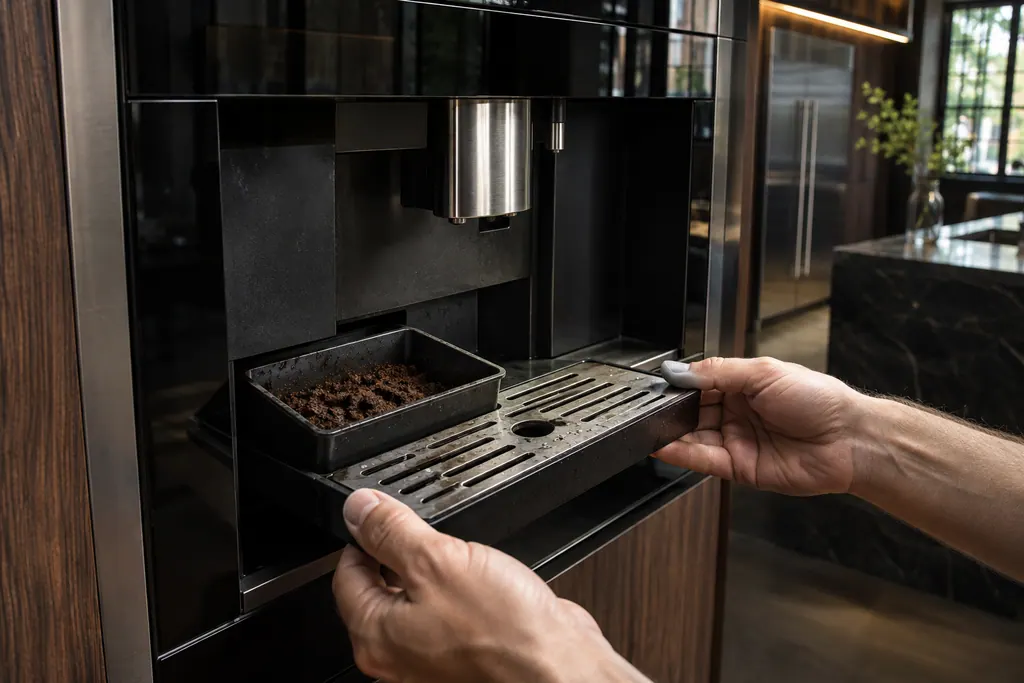
The drip tray catches rinse and drain water and the grounds container holds spent pucks.
Read the definitionThe grounds container is full and must be emptied and cleaned.
Read the supporting manualTurn the coffee system off, remove the cup tray and grounds container, empty it, and clean it with a soft damp cloth, getting residue off the bottom.
Read the supporting manualEmpty the drip tray as well, and watch its red float. JennAir says the container is emptied whenever the tray is pulled.
Read the supporting manualOnly if it stays after you have emptied, wiped and reseated everything. JennAir prints no part for this message.
Read the supporting manualManufacturer document
JennAir Product Help (producthelp.jennair.com)
dateModified 2025-03-19; PH 2754 / PH 2754 (built-in coffee maker)
Manufacturer document
JennAir Product Help (producthelp.jennair.com)
dateModified 2026-11-06; PH 1711 / PH 1711 (built-in coffee maker, drip tray and grounds container)
Scope: JennAir built-in coffee maker. Read from the JennAir Product Help message page for this code and checked against the overview page of display messages (November 2026).
The page only states that the container is full and must be emptied. The machine decides, so empty it and wipe it as shown.
JennAir's steps do: press On/Standby and wait for the shutdown rinse before removing the tray.
JennAir's cleaning page says to empty the grounds container whenever the drip tray is pulled out, and to empty the tray before its red float rises.
Check that the container is seated in the tray and the service door is closed. If it still returns, book a visit.
Code or symptom, part, service call
INSERT GROUNDS CONTAINER means the grounds container was not put back after cleaning. Open the service door and insert it, making sure it sits correctly on the drip tray.
A display prompt halts brewing until you fix the condition: refill and seat the tank for FILL TANK, empty the grounds container, reseat the brewing unit, close the service door, or adjust a too-fine grind. DESCALE needs the descaling cycle. GENERAL ALARM means clean the inside.
The drip tray catches rinse and drain water and the grounds container holds spent pucks. JennAir says to empty the tray before its red float rises above the cup grid, and to empty the grounds whenever the tray comes out.
Schedule a diagnostic for your model, carried out at the appliance.
Office details, plus the access notes to pass along.